Tuesday, February 4, 2014

Keeping Your Data Safe During Travel

Usually, when you are on the road traveling, the last thing you are going to think of is keeping your data secure. But either way, the data contained within your mobile devices is extremely vulnerable to security breaches whether you're thinking about it or not. When you connect to Wi-Fi hot spots while you're at the airport and dealing with important business over unsecure wireless connections, you are actually taking a pretty big risk. There are a few things that you should always keep in mind while you are working on the go in order to make sure that you and your information stays as safe as possible.

1. Make Sure Your Passwords Are Strong

I would hope that this would go without saying. We get it pushed down our throats all the time, and now even when you sign up for something it requires you to create a strong password. But surprisingly enough, "12345678" is still one of the most commonly used passwords of all time. There is actually very efficient password cracking software out there that uses the 1,000 most common passwords, and it is proven to crack 8 percent of users passwords. You should always make sure you have at least an 8 character password that includes one uppercase letter and one number. Those type of passwords are hard for programs to crack.

2. Unencrypted Connections Are Sketchy. Treat Them As Such.

Free Wi-Fi at fast food places or coffee shops seems like a good idea. It's free, and it convenient. Although you should always keep in mind that public connections don't require a password or authentication. This means that they are open for anyone to access them, even hackers. If a connection requires a password or some type of authentication, that means that it is encrypted and generally at least a little bit more safe.

3. Just Because You Pay For A Connection Doesn't Make It Secure

Just because a place charges you money to connect to their internet does not mean that it's secure. They don't care about you or your information, they are just happy you gave them money. After that, everything else is your problem. It's hard to tell how safe any connection is unless it's your own, so just make sure that you use caution when you have to do this.

4. Use Software To Locate Your Device

Mobile Device Management software is used to locate your device in case it gets stolen. In the event that something does happen to your device, you can log into your account with a computer or a different device and delete everything on your lost phone. You can also generally track it via GPS and get a good idea of where it is at. Apple products like the iPhone come standard with this type of software, and it is an absolute life saver. Most other manufacturers at least offer something like this, and if not, there are lots of third party apps that to do exact same thing just as good.

Traveling With Too Much Computer Hardware? Call www.Rentacomputer.com Today And You Can Have All The Technology You Need Delivered To Your Destination Nationwide! 800-736-8772

Sunday, February 2, 2014

How To Keep Your Android Device Clean And Fast

There are plenty of reasons why you should make sure to clean out your Android device periodically. When you have tons of apps installed, a lot of them have routines that run constantly and can take away from the performance of your phone. What is even worse than that is the fact that some of them continuously access the internet. This can be a big problem if you do not have unlimited data, which most of us do not.

On top of that, expandable storage on smartphones is becoming more rare with every new smartphone launch. So having all of these old apps and all of their data is taking up useful storage space that you could be using for something... useful.

If your cell phone is suffering from a lack of storage and/or slow performance, then you should take advantage of this article and figure out how to identify and remove the useless things that are taking up all of the precious space on your device.

Store Your Media Elsewhere

All of your media doesn't have to travel with you in your pocket for the rest of your life. Let's face it, you're never going to look at most of it ever again, even if you don't want to delete it. So, if your phone storage is getting low, offload your media to a PC.

if you open your device's settings, you can see a graph that shows all of the storage in use and the available space you have left. You can look at this to determine where you should start freeing up space. Pay attention to the pictures and videos section. These take up a lot of space, and they make the most sense to store on your computer instead of your phone.

To do this, open the settings option under "Storage" on the device. Touch USB connection on an Android KitKat device and then connect as Media Device. Then plug in a USB cable from the device to your PC and let the drivers automatically install on the PC. After that, all you have to do is use Windows Explorer to browse through all of your phone's files and drag them on to your computer into any folder that you would like them to be saved under. After they have been successfully removed from the device, just delete them off the phone. You can even reverse this to put them back on your device later if you want to.

Organization

 You can also get a couple different organization apps and third party screen locks, like Cover Lock Screen. Some screen lock apps are useful if you have tons of app launch icons on your home screen. They can even learn which apps you use, when you use them, and from where, and then deliver them as you need them. This is pretty successful in cutting down on date usage.

For Android Tablet Rentals Nationwide Call Rentacomputer.com Today At 800-736-8772


Tuesday, December 10, 2013

Best Travel Apps From 2013

If you have a smartphone or a tablet then you already know how flooded the app market is. Sometimes it can feel impossible to sift through everything and find an app that is even worth the time that it takes to download. We all have those select few apps that we have been using for years, but sometimes you just have to wonder if there is anything else out there that might be better. Unfortunately, this past year didn't give birth to any game changers, but there are in fact a few new apps that could give you a breath of fresh air and help you out in your business travels.

1. Hipmunk

This app has really set the bar in searching for hotels and flights because of it's unrivaled sorting ability. Hipmunk lets you search for flights by class off service and also access your past queries. You can get really in depth and pick your flight based off of travel time, price, or just by airline. You can also choose the "Agony" option and it will show you the flight with the least amount of travel time possible. The hotel search is great as well and can be narrowed down to specific neighborhoods. All of the search results are very easy to read and follow with it's nice looking color coded charts. It will also show you popular places in different areas like restaurants or stores. You can narrow your search by choosing different options like business, kid friendly, luxury, or romantic.

2. Refresh

This app lets you get your creep on. Basically, it shows you all of the available data about a person that you are getting ready to meet. This could be a potential new employee that you are about to interview, someone you may be considering working for, or even just someone you're thinking about taking on a date. It uses various social media profiles of the person that you search to gather most of the useful information that you may need and puts it in one place for you. They claim that the purpose of the app is to eliminate the grueling pain of awkward small talk when meeting someone for the first time, but you can choose to do with it what you will. I think it's a neat idea for job interviews.

Need Short A Short Term Technology Rental On Your Next Trip? Click Here!

3. Viber

Viber is an absolutely fantastic app for the traveling business person who finds themselves in a place where they don't have very good cell service, your mobile plan doesn't cover roaming, or your plan isn't unlimited. Basically, this app lets you make phone calls and send text messages for free as long as you have a Wi-Fi connection. Most people probably think that Skype would be the best for this, but when you make a call or send a text with Viber, it uses your existing phone number. On top of that, syncing all of your existing contacts with the app is probably the easiest thing in the world.

4. MyCityWay

This app gives you a very quick description of any city that you may want to know more about. You can choose categories for dining, pharmacies, weather, local news, and public transit. This is the perfect app for when you are traveling and end up staying in a city that you aren't familiar with. I would recommend that you download it instead of skipping over it because the name makes it sound dumb

5. Taxi Magic

This is one of the easiest ways to get a cab. It works in 60 U.S. cities and provides you with immediate pickups, fare estimates, and you can even make reservations to be picked up at a later time or date. You can also track your taxi to find out where its at so that you can be inside until the moment it arrives. Possibly the best part is that you can pay ahead of time via credit card and get a receipt emailed to you. Doesn't get much easier than that, right?

Friday, November 15, 2013

The Benefits and Advantages of Cloud Storage

In the world today technology continues to rapidly advance and improve. This is true not only in the entertainment world with things like 4K TVs and new video game systems, but also in the business world and in technology that people can use on the go. There is perhaps no better area that this is evident than in the area of data storage, specifically "cloud storage".

To someone that works on the go or someone that is frequently using different devices to access files and work, cloud storage is in many ways a dream come true. In essence, cloud storage is a backup and storage service on the internet. Cloud storage allow people and businesses to sync files, photos, videos, and much more across a wide range of devices and can be accessed from anywhere there is an internet connection. While the adaptation and growth of cloud storage started off slow, it has grown rapidly over the last couple of years and there are now many different companies that offer cloud storage solutions for both individuals and for businesses.

Perhaps the greatest benefit of cloud storage, other than a backup of your files that can be accessed from anywhere there is internet, is the ability to sync everything in your cloud storage to so many different devices. In the past, traditional desktop and laptop computers were the only way to access files stored on the cloud. However, with the rapid advancements made in mobile technology, smartphones and tablets can also access, view, and edit many of the files that are stored in the cloud. This is a great advantage for anyone that works on the go as they can pull up that spreadsheet while riding the bus, view and study a PowerPoint presentation while sitting at the airport, or view photos and videos while eating a bite of lunch. In addition, many of the popular cloud storage services allow you to save files to your smartphone or tablet to view them even when you do not have a internet connection.

As cloud storage has continued to grow, so have the number of organizations that offer cloud storage solutions. While there is perhaps no perfect storage provider that can meet the needs of everyone, there are a few that tend to stand above the rest. The three most popular and perhaps best storage solutions are Dropbox, Google Drive, and Microsoft SkyDrive. All of these providers offer free cloud storage up to a certain limit ranging from 2 GB to 15 GB, and also offer paid subscription plans for much greater storage capabilities. For example, Google Drive offers people with a Gmail account and a Google+ account 15GB of storage with the option to increase storage to 16 TB. All cloud services have different benefits and bonuses, the great thing about the expanded field of choices is the ability to chose the right one for you.

In the end, cloud storage may not be the perfect solution for storing all you data. Plans can be expensive for large storage options and security can occasionally be a concern. It is however a useful tool for the right data and a huge benefit for people that use many different devices. One tip is that people should not put all of their files online nor should they keep them only on the cloud. It is a good idea to keep a physical backup of your data where you can always retrieve it if you cannot access the internet or the company has issues syncing your files.There are always going to be some risks to relying on the internet for your files, though as technology advances this is becoming less and less of a problem. Ultimately though, if you can find the right storage provider that meets your needs and can utilize the "access anywhere" capability of cloud storage, than working on the go may just get a little bit easier for you.

Monday, September 30, 2013

Harnessing Microwave Energy


Usually the first, and only thing that comes to mind when you think about your microwave is that it will heat up your food quickly, so you can eat it when you're ready to. This may not be the only function you think of when you hear the word "microwave" much longer, these kitchen appliances may also be used to charge your phone in the future. Research is being done in Tokyo Japan to make this far fetched idea into reality.

At first, a microwave that charges your phone seems a little ridiculous, but most people don't know that a microwave emits a lot of wasted energy, that could potentially be used for something like keeping your phones battery charged. A man name Yoshihiro Kawahara is leading a team of researchers that are designing a device that can harness and recycle all of that wasted energy and use it for practical things like charging smaller batteries in other devices. This idea was inspired by NASA's attempt at harnessing waste energy produced by the sun and using it as yet another alternative energy source.

Although we probably won't see this phone charging microwave in the immediate future due to regulations on how much energy microwaves are allowed to emit, the advancements are definitely something that can be used in many beneficial ways. As this technology is updated it will absolutely help people easily reduce their carbon footprint by recycling a lot of energy, that is usually considered to be wasted. I know that I personally feel like this is a great idea, and as it is refined it will dramatically decrease the amount of energy we waste on a daily basis.

Friday, September 20, 2013

Cat Paw Breaches Through iPhone 5S Fingerprint Scanner

So now that the iPhone 5S has been out for a few days or so, this is when the fun starts. All the bugs will begin to show themselves. One such bug that many did not expect to see is actually affecting one of the biggest features of the iPhone 5S: the fingerprint scanner. Now the issue with this feature that is now being reported is not that it doesn't unlock due to sweater fingers, but that it opens and accesses your phone with things other than your fingerprint. Everything from your palm, to your forearm, and now even a cat's paw will do the trick.

This is not shaping up to be a good look for Apple's new iPhone, and albeit that we should expect bugs in the new feature, I don't believe that anyone was expecting an animal to be able to access their phone.  With so many people upgrading their phones and getting the new iPhone, it can be very risky to consumers with jobs that require a level of security. The fact that this feature was looked at as one the the main reasons to buy the new 5S is only giving this phone a bad look in terms of security. This news has now become so important that now even hackers are getting involved with this as well.

With the hackers offering a fairly handsome reward, it can only be assumed that the information on how to hack the new scanner properly would be used for malicious intent. The reward has been increasing steadily as well, so now hackers will have a little more incentive. The act of "lifting" someone's fingerprint seems to be the best way to go about tricking the new scanning feature. Supposedly there a few different ways to go about doing this, so now it begs the question, how secure is your new iPhone 5S really?

Now that these issues are starting to arise with the new Apple device, one can only hope that they are working around the clock to try and figure out the issue and resolve it. The main concern with that is that we, as the consumer, can't be sure whether the issue is in the hardware or the software. The only real failsafe involving the scanner is that a numeric passcode is required if the phone is left untouched for at least 48 hours. It hasn't been long that the new 5S has been out and with issues like this already occurring, it doesn't look good for Apple right now.

Monday, September 16, 2013

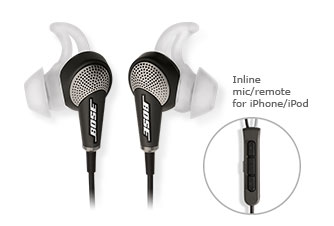
Bose QuietComfort 20i Acoustic Noise Cancelling Headphones

By Michael Luciano

We have all been there. That time when you are listening to your favorite song at such a high decibel that you start to get the "look" from passersby. Some of us only do that for the sake of being able to hear it within areas where it can be nearly impossible to enjoy our music. This is where the noise cancelation headphones come in, only this time, they are a bit smaller.

Bose has introduced a much more condensed version of their top of the line, noise canceling headphone, now in the form of ear buds. The new Bose QuietComfort 20i has got many features that not a lot of people would expect from noise cancelation headphones, especially not in ear bud form. Featuring a rechargeable battery for the noise canceling feature eliminates all need for batteries. This alone takes away a common expense for most headphones of this type. It also allows for ambient noise to peak through when you need it to, by the means of an "Aware" mode. Always good for when you are walking through a bustling city.

While all of these features are good, there is always a downside to something that seem to good to be true. With $299 being the cheapest price for these beauties, it's not likely to see an average consumer shell out this amount of money for headphones, but it is definitely a top contender, especially seeing as it's design is suited for more practical use than most headphones. Still, these are going to need a bit of a price adjustment before I decide to pick up my pair.

Source: Bose.com